Every teacher knows the feeling. It’s 10pm on a Sunday, you’ve got a stack of 120 scripts from last week’s mock, your marking scheme is open in one tab and a half-written report is open in another, and somewhere between the two you’ve promised yourself: next time, I’m going to find a better way.
AI marking tools have been promising to be that better way for a couple of years now. And like a lot of teachers, we tested as many of them as we could get our hands on — generic AI tools, specialist edtech platforms, everything in between. What we found was equal parts illuminating and frustrating. This is our honest account.
First, We Tried the Obvious: ChatGPT and Generic LLMs
The first instinct of most teachers trying to automate marking is a sensible one: just ask ChatGPT. It’s free, it’s capable, and it can read a mark scheme if you paste one in. For a one-off question with a model answer, it can do a reasonable job.
But batch marking — the actual problem teachers need to solve — is a different beast entirely.
When you’re marking 30, 60, or 120 scripts at once, the errors don’t just add up. They compound in ways that are genuinely dangerous for students. In our tests, generic LLMs made several categories of serious mistakes that no human marker would ever make:
They hallucinate mark scheme content. This is the big one. Ask a general-purpose AI to mark against AQA mark scheme criteria and it will, confidently and fluently, invent marking points that simply don’t exist. A student answer that correctly identifies, say, the role of ATP in active transport might receive a comment praising them for a point about “mitochondrial membrane permeability” — a phrase that appears nowhere in the real mark scheme. The AI sounds authoritative. The feedback is fiction.
They drift across a batch. Even when you keep the mark scheme fixed, generic LLMs have no true consistency mechanism across a large set of scripts. The same student response, submitted as script 5 versus script 85 in a batch, can receive materially different scores. Marking is supposed to be standardised. Generic AI marking is anything but.
They misread partial credit. AQA mark schemes use structured “allow” and “reject” lists, level-of-response descriptors, and qualified statements that require careful interpretation. Generic LLMs regularly miss the nuance — either awarding a mark for a response that a real examiner would reject outright, or penalising a student for phrasing that is explicitly permitted under “accept” criteria.
They can’t handle the format of real exam papers. Paste a real past paper or an ExamPro-generated paper into a generic AI tool and you’ll quickly discover that it struggles with the structure: multi-part questions, answer lines, diagrams, tables, command word interpretation. It often processes the document as a wall of text and loses track of which answer belongs to which question entirely.
The bottom line on generic LLMs is this: for a single student’s extended response on a familiar topic, they can offer useful feedback. For anything resembling real batch marking of real exam papers, the error rate is too high and too unpredictable to trust.
Then We Tried the “Specialist” Platforms — and Hit a Wall
Once we’d established that general AI tools weren’t fit for purpose, we turned to the growing category of specialist AI marking platforms. There are more of them than you’d think, and many of them look extremely promising at first glance.
The websites are polished. The language is compelling. You’ll read phrases like “instant, accurate AI marking,” “aligned to your exam board,” “save hours every week,” and “trusted by thousands of teachers.” One or two will show you a pricing page. Some have a blog. A few have a waiting list.
And then you try to actually use them.
No screenshots. No videos. No proof of life.
The first thing we noticed across multiple platforms was the complete absence of any visual evidence of the product working. Not a single screenshot of the marking interface. Not a demo video showing a real paper being processed. Not a GIF, not a screengrab, not a sample output. Just stock photography of students at desks and abstract illustrations of “AI.”
This is a significant red flag that is easy to miss when you’re reading enthusiastic marketing copy. But think about what it means: if your product genuinely works well, you show people. You show them everything. The fact that a platform goes to the effort of building a professional-looking website while not once showing the actual tool in action tells you something important about the gap between the promise and the reality.
Broken sign-up pages and dead ends.
Several platforms we attempted to trial had sign-up flows that simply didn’t function. Buttons that did nothing. Forms that submitted without confirmation and never sent a verification email. “Request a demo” forms that appeared to submit but produced no response, even after several days. One platform’s school registration flow crashed on the final step — consistently, across multiple browsers — with no error message and no fallback.
These aren’t minor UX issues. They’re evidence that the product hasn’t been finished, let alone tested at scale.
Features that don’t exist yet — or possibly ever.
The most frustrating category is platforms that advertise specific functionality that, when you eventually get access, turns out not to exist. Automated marking against AQA criteria? Available “in a future update.” Bulk upload for whole-class sets? “Coming soon.” Integration with your school’s MIS? Listed on the features page, not present anywhere in the actual platform.
There’s a well-worn tradition in software of selling the roadmap as if it were the product. In a low-stakes consumer app, that’s forgivable. In a tool that teachers are being asked to trust with student assessment data, it’s a serious problem.
The “only works with our papers” trap.
Perhaps the most quietly limiting constraint we encountered — and it affects more platforms than you’d expect — is that the tool only works with papers generated by the platform itself.
In practice, this means: if you’re using real AQA past papers, you can’t use the tool. If your department has built a set of assessments in ExamPro, you can’t use the tool. If you’ve created your own question paper, adapted a past paper, or combined questions from multiple sources — as virtually every teacher does — you can’t use the tool.
The result is that the platform doesn’t integrate with your existing workflow. You’d have to rebuild every assessment from scratch inside their system, tag every question to their taxonomy, and abandon the bank of materials you’ve spent years developing. For most teachers, that’s not a trade-off they’re willing to make. And rightly so.
What GradeDrive Actually Does Differently
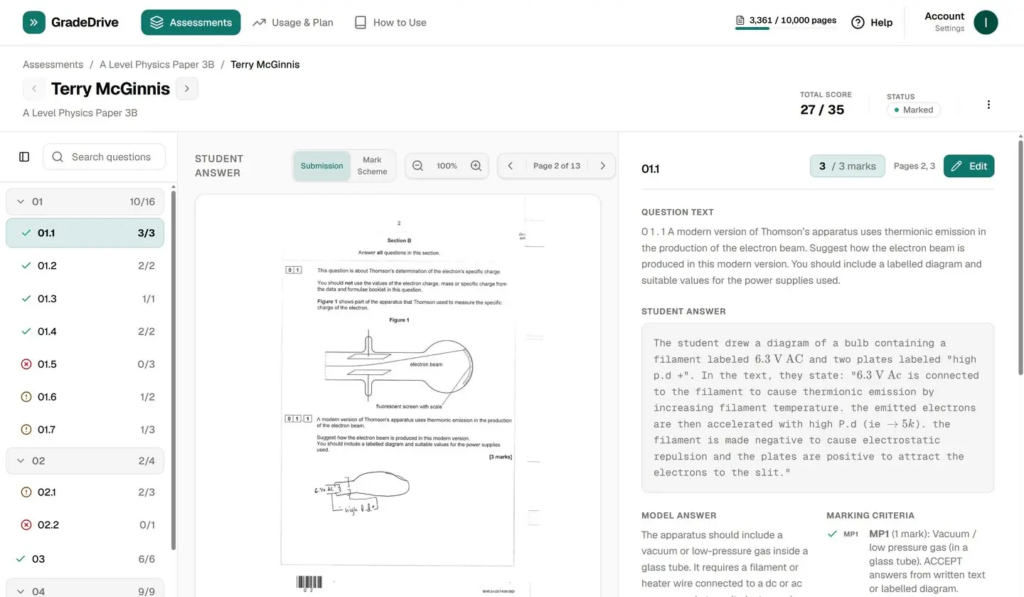
It works with real papers. Not just papers generated by GradeDrive — your actual past papers, your ExamPro exports, your department’s own assessments. Upload a PDF of a real AQA paper and a PDF of a student’s script, and GradeDrive handles it. That’s the workflow teachers actually have. We built to match it.
It marks against the real mark scheme, not a paraphrase of it. GradeDrive uses the actual mark scheme — with its allow lists, reject lists, level-of-response bands, and qualified credit rules — as the basis for AI marking. It doesn’t summarise the mark scheme and hope for the best. It applies it.
It doesn’t make things up. This was a non-negotiable design goal from day one. If a student’s answer doesn’t match a marking point, GradeDrive says so — it doesn’t invent a reason to give credit. If the mark scheme is ambiguous, it flags that rather than guessing. Accurate feedback that a teacher can stand behind matters more than impressive-sounding feedback that might be wrong.
It’s consistent across a whole class set. The same response receives the same treatment regardless of whether it’s the third script or the thirty-third. Standardisation isn’t a nice-to-have in assessment — it’s the point.
The interface actually exists and you can see it working. GradeDrive shows screenshots, real outputs, and the interface because they actually exist and work.
If you want to understand the process in more detail — from paper upload through to per-student feedback — the GradeDrive how it works page walks through it step by step.
A Realistic Picture of AI Marking in 2026
We want to be honest about something: no AI marking tool — including GradeDrive — is a complete replacement for a trained human examiner on a high-stakes qualification. That’s not what AI marking is for, and any platform claiming otherwise should be treated with scepticism.
What AI marking genuinely is good for is assessment at scale: giving students faster feedback on classwork and mocks, flagging where a whole class has misunderstood a concept, and reducing the administrative burden on teachers so they can spend more time on the parts of their job that actually require a human being.
In that context, accuracy matters enormously — because teachers need to trust the feedback before they share it with students, and students deserve feedback that is correct, specific, and actually tied to the mark scheme they’ll be assessed against in an exam.
That’s the standard we’ve held GradeDrive to, and it’s the standard we’d encourage any teacher to apply when evaluating any tool in this space.
Try GradeDrive for Free
If you’ve had the same experiences we’ve described above — promising tools that don’t deliver, generic AI that makes things up, platforms that charge for features that don’t exist — we think it’s worth seeing what a tool built by teachers, for teachers, actually looks and feels like.
GradeDrive provide 100 free pages out of the box. No waitlist. No demo request form that disappears into the void. Sign up, upload a paper, and see it work.
Start marking for free → gradedrive.com
GradeDrive is an AI-powered marking and feedback platform designed for UK secondary school teachers. It supports AQA, Edexcel, and OCR mark schemes and works with your existing exam papers — past papers, ExamPro exports, and teacher-created assessments alike.